
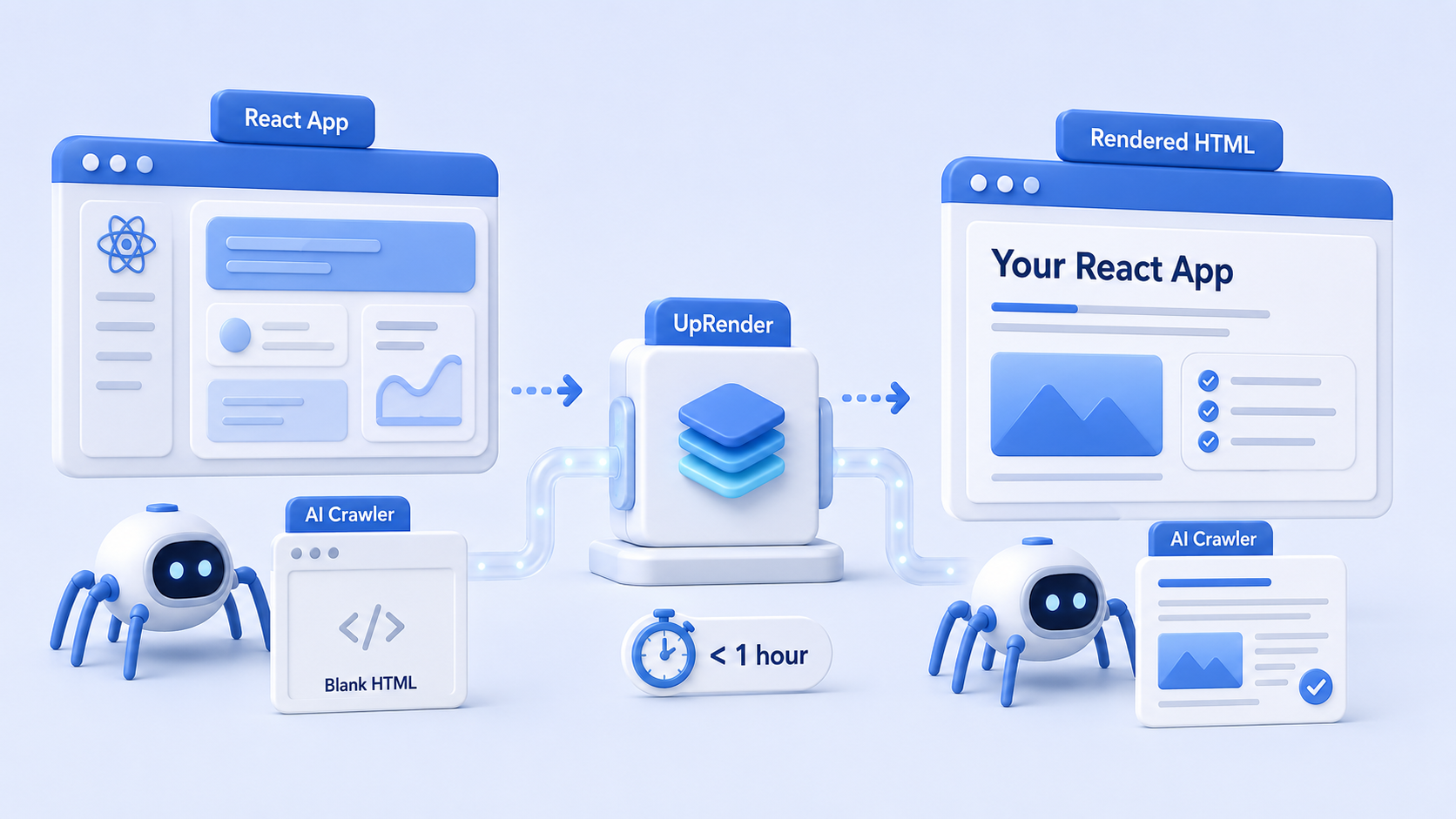
Understanding the Problem: Crawlability and JavaScript
Single-page applications (SPAs), such as those built with React, present unique challenges for search engine optimization (SEO). The primary issue lies in how various web crawlers interpret and index JavaScript content. While Googlebot has made significant strides in rendering JavaScript-heavy websites, other crawlers like gptbot, claudebot, and oai-searchbot can struggle with such frameworks, leading to significant problems with crawlability.
In traditional web apps, content is served directly in HTML format, making it straightforward for search engine bots to crawl and index. However, SPAs rely on JavaScript to dynamically load content, which means that the initial HTML sent to the browser may not contain all the necessary content for indexing. This presents a substantial hurdle, as not all crawlers can execute JavaScript effectively, resulting in parts of the app being invisible to them. Consequently, important content and metadata might not be indexed, hampering visibility in search results.
Different crawlers parse websites through varying methodologies. Googlebot uses comprehensive techniques to render JavaScript content, allowing it to index the material correctly. In contrast, gptbot and similar crawlers may fail to render JavaScript, thereby missing out on critical information hidden within SPAs. This discrepancy can lead to discrepancies in how information is displayed or ranked in search engine results pages (SERPs) across different platforms.
For developers looking to improve the crawlability of their React applications, understanding these nuances is vital. Streamlining JavaScript execution, employing server-side rendering (SSR), or generating pre-rendered pages can enhance the visibility of the application. By addressing these challenges proactively, the likelihood of being indexed effectively by diverse crawlers can significantly increase, ensuring better SEO outcomes for SPAs.
The Limitations of Current Web Crawlers
Web crawlers, such as gptbot and its counterparts, play a pivotal role in indexing content for search engines. However, they encompass a number of limitations that complicate their effectiveness, particularly within the context of modern web applications developed using frameworks like React. A significant drawback of these crawlers is their inability to execute JavaScript content. This limitation is critical when it comes to client-side rendered applications, as most React applications rely heavily on JavaScript to dynamically render content on the user’s browser.
When gptbot encounters a React app, it primarily processes the initial HTML document sent from the server. If this document does not contain the necessary content due to JavaScript rendering on the client-side, the crawler receives an empty response. Consequently, the lack of executed JavaScript means that gptbot fails to index the rich content that React applications often hold. This issue effectively results in search engines missing critical information, which can severely impact the application’s discoverability and ranking in search results.
Moreover, the limitations are not limited to just gptbot. Other traditional web crawlers face similar challenges, as they are designed to parse static HTML rather than interpret JavaScript execution. Without the ability to ‘see’ the finalized output that users and browsers experience, these crawlers cannot accurately assess the relevance or significance of a React application’s content. This hinders their ability to deliver comprehensive search results, potentially causing a loss of traffic for developers who have built their applications using such frameworks.
Verifying the Issue: Using Curl to Simulate Crawl Requests
To diagnose why ChatGPT is unable to access your React application effectively, one crucial step involves using curl to simulate requests as different user agents, including the gptbot. This process allows developers to observe the raw HTML output generated by their applications when accessed in this manner, facilitating the discovery of any obstacles preventing proper rendering.
Firstly, ensure that curl is installed on your machine. Most Unix-like systems come with it pre-installed. You can confirm its availability by running curl --version in your terminal. Once verified, you can proceed to execute a command that imitates the behavior of gptbot.
Use the following command to request your React app’s homepage:
curl -A "Mozilla/5.0 (compatible; gptbot/1.0; +http://gptbot.io/)" -o output.html https://yourreactapp.comIn this command, the -A flag sets the user agent to gptbot, while -o output.html saves the returned HTML to a file named output.html. Ensure to replace https://yourreactapp.com with the actual URL of your React application.
After executing this command, open the generated output.html file in a web browser. Assess the content thoroughly. If the HTML appears empty or lacks the expected elements, it may indicate that your app’s client-side rendering is preventing crawlers from accessing essential data. Furthermore, consider checking your server’s access logs to confirm whether the request from gptbot was received and how it was responded to.
By conducting this verification step with curl, you can identify what your application serves to different user agents, helping clarify the limitations that may be hindering ChatGPT’s access and engagement with your web application.
Comparing Outputs: Curl vs. Rendered DOM
When assessing the output generated by a web application, it is crucial to differentiate between what is returned by curl and what users experience in the rendered Document Object Model (DOM). The curl command-line tool fetches the raw HTML from the server. This output is indicative of the initial server response before any client-side processing occurs. Therefore, it often lacks the dynamic elements that JavaScript frameworks, such as React, introduce.
In contrast, the rendered DOM represents the fully processed state of the application as it would appear in a web browser. This state is achieved after JavaScript execution, which transforms static content into dynamic interfaces. Users may encounter elements like interactive forms, animated components, or data fetched from an API, not present in the original output retrieved by curl. As a result, discrepancies may arise between these two outputs, leading to potential challenges in indexing by search engines and web crawlers.
To better illustrate this distinction, consider performing a curl request on your React app’s URL. The output will show the basic HTML structure, including placeholders for dynamic content that relies on JavaScript for population. Conversely, inspecting the page in a browser reveals the actual user experience, complete with all dynamic elements post-JavaScript execution. This is why relying solely on curl output for content assessment can be misleading.
Understanding these differences is vital for developers aiming to optimize their applications for search engines. Ensuring that critical content is accessible to crawlers often requires server-side rendering or other techniques that make the rendered DOM readily available. By doing so, developers can bridge the gap between raw data retrieval and user interaction, enabling successful indexing of their React applications.
The Rendering Layer: Introducing Uprender
In the dynamic landscape of web development, ensuring that search engine crawlers can properly index your application is paramount. One of the core challenges faced by developers working with Single Page Applications (SPAs), such as those built with React, is how to render content that is accessible to these crawlers. This is where Uprender comes into play as a compelling solution aimed at addressing this very issue.
Uprender is a specialized rendering layer designed to optimize your React application for better crawler visibility. Traditional SPAs often render content on the client side, which can create barriers for bots like gptbot that rely on server-side rendered HTML for proper indexing. Such inability to see your application can lead to poor search engine performance and lower visibility in search results, which ultimately affects traffic and user engagement. Uprender bridges this gap by generating a fully-rendered HTML snapshot of your React application at the server level prior to client-side engagement.
This process allows gptbot and similar crawlers to promptly access the complete content of your application without requiring JavaScript execution, thus facilitating better indexing and exposure in search engines. With its seamless integration, Uprender ensures that your React app fulfills the essential criteria for being discovered and indexed correctly, significantly improving its search engine optimization (SEO) metrics.
Employing Uprender not only addresses the rendering obstacles that arise with client-side rendering but also enhances the overall performance of your application, making it a vital addition to any modern web development strategy. By embracing this rendering layer, developers can create robust applications that are both user-friendly and highly optimized for search engines, ultimately driving more organic traffic to their websites.
Implementing Uprender: Steps to Fix Your React App
To address the visibility issues faced by your React application, implementing Uprender is an efficient solution that can be completed within an hour. This practical guide breaks down the necessary steps for integrating Uprender into your application, ensuring that search engines can access and index your content effectively.
First, ensure your development environment is set up properly. You will need the latest version of Node.js installed on your system. Next, create a new React application or navigate to the existing one you wish to enhance. Open your terminal and run the command:
npx create-react-app your-app-name
or, if you already have an app:
cd your-existing-app
The second step is to install the Uprender package. In your terminal, input the following command:
npm install uprender
By installing Uprender, your application gains the capability to handle server-side rendering, which enhances visibility for search engines and improves the user experience.
Incorporate Uprender into your application by modifying the existing entry point. Replace the code in the default index.js file with the following:
import React from 'react';import ReactDOM from 'react-dom';import Uprender from 'uprender';import App from './App';Uprender.render(, document.getElementById('root'));
This code utilizes Uprender to allow your React application to be rendered on the server side. After this adjustment, you will need to configure your web server (such as Node or Express) to properly handle requests and serve your React application.
Finally, test your implementation to ensure everything works smoothly. In your terminal, run:
npm start
Navigate to your browser and check if the application is rendering correctly. With these straightforward steps, you can successfully implement Uprender in your React application, improving its accessibility and search engine visibility. This process is designed to be user-friendly, accommodating both seasoned developers and newcomers alike.
Before and After: A Visual Demonstration of Results
When examining the performance of a React application in terms of SEO and web crawling, it is essential to understand how web crawlers interact with the HTML output generated by the application. Before any optimization is applied, a standard React app often serves minimal HTML content to search engine bots. This can lead to poor indexing and visibility in search engine results.
Below is a visual representation illustrating the raw HTML output of a React application prior to implementing Uprender. The initial scenario typically displays a series of nested <div> tags and scripts, which are not easily interpreted by crawlers. The server-rendered content is shallow, lacking meta tags, headings, and structured data that are crucial for SEO.
Once Uprender is employed, the output undergoes significant enhancement. The optimization process transforms the raw HTML to include descriptive elements such as <title>, <meta> tags, and properly populated <h1> through <h6> headings. Search engine bots now receive additional context and structured information that aids in better indexing and understanding of the web page’s content.
This transition not only improves SEO performance but also enhances the user experience by loading content more swiftly and succinctly. The comparison emphasizes how adopting a server-side rendering strategy through Uprender can dramatically uplift how the content is served to crawlers. By optimizing this aspect of your React application, you enable better visibility on search engines, which is paramount to any web strategy.
SEO and AEO Benefits of Fixing Indexing Issues
Addressing the indexing issues related to your React application can have profound implications for both Search Engine Optimization (SEO) and Answer Engine Optimization (AEO). Ensuring that search engine crawlers can access and analyze the entire content of your website enhances your site’s visibility on search results, leading to an increase in organic traffic. When your web pages are correctly indexed, search engines can effectively understand their relevance to user queries, which is critical in matching users with the content they are seeking.
For SEO, proper indexing helps improve your site’s ranking, as search engines reward pages that provide high-quality, accessible content. In the context of React applications, which may rely on client-side rendering, optimization is essential. If crawlers cannot index essential content, this may result in lower search rankings. By resolving these issues, you enable search engines to discover and index all relevant content effectively, thus promoting a better ranking overall.
Moreover, when it comes to AEO, fixing indexing concerns plays a critical role in supplying accurate, succinct information that voice-activated devices and smart assistants require. With the rise of voice search and AI-driven answer engines, it is crucial that your content is not only indexed but also structured in a way that is easily interpretable by these technologies. By ensuring that your React application is fully accessible, you can improve the likelihood of your content being served as a quick answer to user queries, thereby tapping into the rapidly expanding demographic of voice search users.
In conclusion, addressing indexing issues is beneficial for both SEO and AEO. Ensuring that your React app is fully indexed not only enhances search engine discoverability but also paves the way for a broader reach in response-driven environments, ultimately driving more traffic and enhancing user engagement.
Conclusion: Overcoming Crawlability Challenges in SPAs
In the evolving landscape of web development, ensuring that single-page applications (SPAs) like those built with React are readily crawlable is paramount for maintaining visibility in search engine results. The core challenges related to crawlability stem from the dynamic nature of SPAs, which often rely on client-side rendering, leading to issues with indexing by search engine bots such as ChatGPT.
Throughout this discussion, we emphasized the necessity of utilizing effective solutions such as server-side rendering (SSR) and pre-rendering. These techniques ensure that web pages are presented in a way that search engines can readily interpret. By implementing SSR, the initial rendering of the page occurs on the server, allowing crawlers to access fully rendered HTML. Meanwhile, pre-rendering allows developers to create static versions of dynamic pages that search engine bots can easily crawl.
Additionally, configuring routes appropriately and utilizing the right meta tags can significantly enhance how search engines perceive your application. Incorporating fallback solutions, such as a sitemap, is also crucial to guide crawlers directly to important content. Developers should be aware of the specificities of frameworks like React to implement these strategies effectively.
Ultimately, the ability to effectively mitigate crawlability issues in SPAs can profoundly affect a website’s search engine optimization (SEO) performance. By committing to best practices and leveraging modern rendering techniques, developers can significantly enhance the indexing of their applications. Adopting these measures not only improves search visibility but also enriches user experience, making content more accessible to both users and search engines alike. Ensuring that applications are crawlable is not just a technical requirement; it is an essential component of a successful online presence.